How to use font awesome's social font icons in blogger ?

February 25, 2016
Font icons are used to replace the images in web designing. Its nature is same like the nature of a text or font. All the attributes of a text can be applicable on this icon. Font icon makes your website structure quite attractive and context relevant.

Of course, you also use font icons into your blogger template. However, it consume a little time to load that font icon's script. In fact, font icon works by a css script. While you use a css script that reloads / renders the icons which contain in the .EOT, .SVG or WOFF files. There are many font icon generating script you can find. Among them, I mostly like the font awesome icons because it is very simple and easy to use.

The characteristics of font icons:-
  • It is a scalable vector icon - Scalable means that you can increase and decrease its size giving its size.
  • It uses all the attributes of <a></a> tag.
  • Its weight and size is low; it does not consumes more memory.
  • It does not take more time to load; it is like a text.
Step 01: Login into your blogger dashboard>>template>>edit html, find the </head> tag and paste the following css link just above it.
<link rel="stylesheet" href="https://maxcdn.bootstrapcdn.com/font-awesome/4.5.0/css/font-awesome.min.css">
Step 02: Now, here are some classes of font awesome that generates the social icons. You just copy the following code accordingly into your blogger template.

To add facebook font icon, use any of the following class code

<i class="fa fa-facebook"></i>
<i class="fa fa-facebook-official"></i>
<i class="fa fa-facebook-square"></i>

To add twitter font icon, use any of the following class code

<i class="fa fa-twitter"></i>
<i class="fa fa-twitter-square"></i>

To add google plus icon, use any of the following class code

<i class="fa fa-google-plus"></i>
<i class="fa fa-google-plus-square"></i>

To add flickr icon, use the following class code

<i class="fa fa-flickr"></i>

To add pinterest icon, use any of the following class code

<i class="fa fa-pinterest"></i>
<i class="fa fa-pinterest-p"></i>
<i class="fa fa-pinterest-square"></i>

To add linkedIn icon, use any of the following class code

<i class="fa fa-linkedin"></i>
<i class="fa fa-linked-square"></i>

To add youtube icon, use any of the following class code

<i class="fa fa-youtube"></i>
<i class="fa fa-youtube-play"></i>
<i class="fa fa-youtube-square"></i>

To add tumbler icon, use the following code

<i class="fa fa-tumblr"></i>
<i class="fa fa-tumblr-square"></i>

To add tripadvisor icon, use the following code

<i class="fa fa-tripadvisor"></i>

In the above list, I have included some more popular social medias' icons. However, you can find many more font icons generated by font awesome from its official github page. If you have any problem while adding the following code, please inform us.
How to install wordpress and make a blog post within few minutes

February 23, 2016
Hello friends, are you looking to start blogging ?
Do you want to express your feelings and experience?
Do you want to provide lessons for people?
Are you looking for making money through blogging ?
Are you getting confuse on choosing CMS ?

Don't get confused. I use wordpress and I like all the features of wordpress. It is flexible and easy to use so I always suggest you to use wordpress.... because it is dynamic content management system specially used for blogging.You can get number of plugins to manage your sites or blogs. In this tutorial, I am using localhost to install wordpress, but you also can use online hosting to install wordpress, where you do not have to download wordpress through wordpress.org because many of the hosting service provide already install wordpress installer there which easily install wordpress in few seconds.

So lets start installation of wordpress easily in a few minutes......
  1. First of all just download wordpress through wordpress.org
  2. Just unzip it into the htdocs folder of xampp if you are using xampp. If you are using wamp as your localhost, just unzip wordpress into www folder.
  3. When you unzip the wordpress. Then you have to create a database for your wordpress. It must be done before installation of your wordpress.
  4. To make new database goto localhost/phpmyadmin and create new database name - such as "testwordpress".
  5. Now go to url bar and type localhost/YOUR-WORDPRESS-FOLDER name, then hit enter.
  6. Now you will be prompted to a requirements listed page where you make remember of 5 things and they are database name, database username, database password, host and prefix.
  7. If you make and know all these 5 things, you go for installation, otherwise you have to find them.
  8. Now in another window, you have to provide site title, username, password etc and click for run install. In a few minutes your wordpress will be installed if you provide all the correct information.
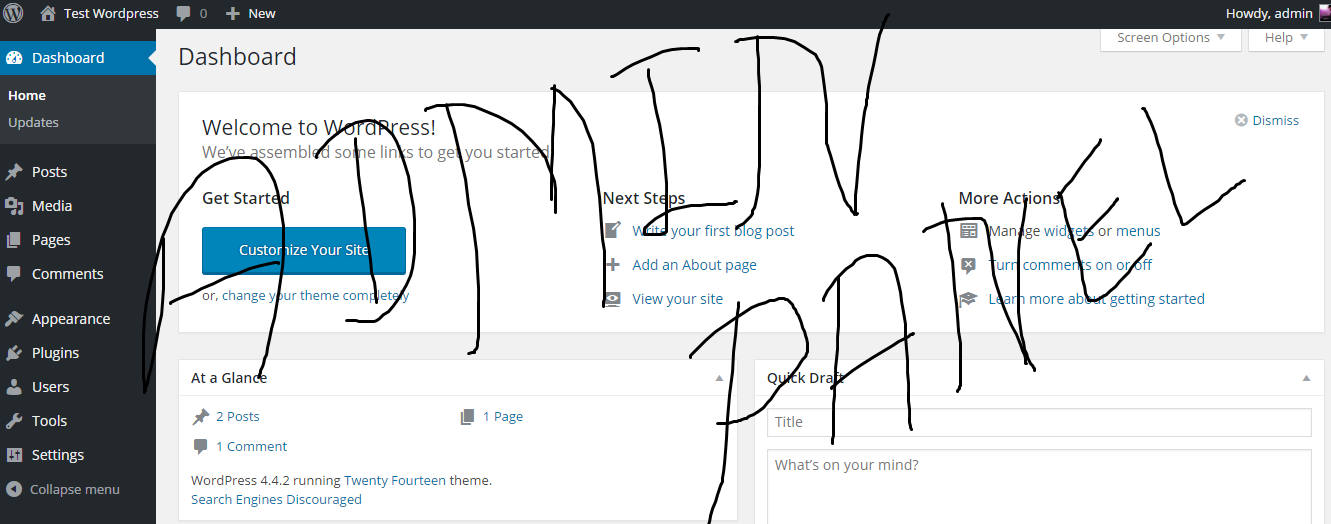
  9. Then login to your dashboard which seems as shown in below figure.
When installation goes completed, you have to login into wordpress dashboard to post where you can get post and page two option to write content. Write a post and click on publish to make a new blog.

Wordpress Admin Panel

Some unusual demerits of using of frameworks in programming

February 22, 2016
Using of framework making programmers lazy
Programming Frameworks
I never deny the goodness of use of MVC architecture in programming field. However, I am always against the use of frameworks to bring MVC architecture in your apps. Of course, using of frameworks provide number of advantages while doing coding. It saves the coding time, which also makes easy to build apps. But you have to know some unusual demerits of using of frameworks which completely destroys and makes your apps clumsy. Nowadays, many programmer or html/css designers, they use frameworks for the simplicity in working. But they even do not know a simple core coding of any programming language.

You may think using of framework is better than doing core coding, but I don't think it is good to use framework. Here are some malfunctions of using of frameworks:-

1) Too much unnecessary codes
If you have used either of frameworks like laravel, codeigniter, cakephp (PHP) or spring (Java) or bootstap (HTML/CSS), you can understand how much unnecessary codes, you have to apply for a simple task or apps.

2) You may forget the core coding techniques
When you use frameworks, most of the core coding techniques are not used here, you may forget core coding in that particular programming language. Suppose, you are a php programmer, you uses wordpress framework to build a website or cake php to build a php application, then you must follow their coding syntax ditto. Hence you will be decreasing your creation ability.

3) Slow Application
The another unusual and most important demerits of using of frame is consuming of too much time for loading of application since it uses too much unnecessary codes which also must be loaded first along with your apps codes.

4) More Threats of Hacking
Most programmers use frameworks for easy coding, easy MVC architecture and fast apps development. Therefore it has high threat of attack of hackers because they properly know the coding techniques, flow of your application's codes and also the weakness of your apps. In some cases of use of bootstrap, you can steal the whole website. Because you properly know that the site is using bootstrap. So you do not have to be worry about the css and jquery which are using in that website.

5) Deficiency of programmers creation ability
Using of Frameworks in programming decrease the new creation of programmers. It is one of the most considerable shortcoming of framework use. Programmers mostly waste their time in the following of coding syntax of frameworks. They mostly forget to use their own creation.

Therefore, I only suggest to use frameworks to those programmer who properly know about the use of frameworks. Programming Frameworks are actually for huge projects/application which consume lots of time and money. Frameworks shorten the codes that is why you must use framework if you are doing a project which demands highly core coding.

Dynamic Adsense Placement - After First Paragraph of Post

January 18, 2016
Adsense After First Paragraph
Bloggers use different techniques of ads placement to get more clicks on their adsense ads and any other. Like, placement of ads inside blog post, bottom of the post, sidebar placement, header placement etc. But I think many may not have applied adsense placement under the first paragraph of the post. This technique is new and I hope this will definitely help to make more money from ads publishers like adsense, infolinks , chitika etc.

Create Infolinks Account and Earn Money

Here is straight process of placing adsense ads just after the first paragraph of a post. This is only applied in blogger blog. Indeed, this technique is for blogger but if you also want to place in other platform like wordpress and joomla. There you may find plugins or you have to put using some codes like below:

How to put ads just below the every blogger post?


Step 01: Login blogger dashboard>>template. And click on edit html . 
Step 02: Just search for <data:post.body/>. Use CTRL + F button to search.
Step 03: In default template of blogger, you can get multiple occurrence of above code, so you have to choose second one.
Step 04: Now replace that code by the below code
<div id='target'><data:post.body/></div>
Step 05: Then place the below code right after the above (step:4 div).
 <script type='text/javascript'>
function insertAfter(addition,target) {
var parent = target.parentNode;
if (parent.lastChild == target) {
parent.appendChild(addition);
} else {
parent.insertBefore(addition,target.nextSibling);
}
}
var adscont = document.getElementById(&quot;content&quot;);
var target = document.getElementById(&quot;target&quot;);
var linebreak = target.getElementsByTagName(&quot;br&quot;);
if (linebreak.length &gt; 0){
insertAfter(adscont,linebreak[0]);
}
</script>
Step 06:  Now you have to add this code just above the target div(step 04 div)
<b:if cond=’data:blog.pageType == &quot;item&quot;’>
<div id='content'>
Adsense code placing center
</div>
</b:if> 
Step 07: This time to put adsense code. So login to you adsense account and copy an adsense code. Then parse this code using adsense parser. After that, replace Adsense code placing center by parse adsense code.

Step 08: Save the template.

That's all. If you got any errors on this widget, please comment below the comment box. I will get you on there. Thank you. Enjoy blogging. 

Online reputation management tips for blogger

December 26, 2015
Online reputation management is very important and keep in mind that your online reputation is your identity on the Internet. When you begin a blog or any online business, it is important to make online reputation. Online Reputation Management denotes that of getting better or reinstating your blog or your brand’s good status. The bloggers can attain good reputation online by means of defying, waning or eradicating the negative image or material found in the Internet. The best means for the bloggers to acquire online reputation is through overcoming their negative material with more positive material.
Online Reputation Management

Without a doubt, bloggers can improve their credibility and customers’ trust in them by means of online reputation management. One of the most imperative features of blogging is having a superior internet standing. Obviously, it takes a lot of time to get going for the new bloggers and also to establish good reputation in the field. However, establishing an excellent internet identity from the very start will provide your blog an enhanced opportunity to challenge effectively with other more recognized blogs. It can also assist you to bring in loyal followers from the commencement itself. Following are some of the effective online reputation management tips for bloggers:

1. Monitor Online Reputation

It is always very imperative to monitor your online reputation every now and then. Your fans and followers might go away from your blog when they see bad reviews, negative blog posts or comments in your blog.  Keep in mind that bad reviews, negative blog posts or comments in your blog can stretch in diverse online mediums such as in search engine results and in social media networks. These can have an effect on your brand, business, or blog. Therefore, it is vital to have your online reputation monitored every so often and erase negativity, bad reviews, negative blog
posts or comments so as to build positive reputation.


2. Opt A Good Name

As far as the bloggers are concerned, it is must for them to make first good impression. Selecting a good blog name can indeed help the bloggers to draw the attention of other established bloggers and people online. So, when you start a blog, make sure to have a catchy name that will appeal to your target market or people.

3. Go for SEO

Things Good For Seo
SEO has become very important for any online business and promoting a brand online. The bloggers need to have superior search engine ratings since it makes easier for people to locate you on the internet. You can achieve this by means of doing SEO. SEO means doing online promotion by making use of keywords that are related to your business or blog. Without a doubt, SEO can aid you to get the attention of more people and also guide you to rank top in search engines.

4. Share Information On Your Area

Another most important thing that the bloggers are required to do is sharing information on their area. Without sharing information about your blog, none of the people can understand the objective of your blog. Blogs let you to display your knowledge and professionalism. Blogs can aid you to find new clients and also to make them to trust you and your products. So, bring into play blogs to share free information on your area of business so that you can spread the objective of your blog amid people.


5. Build Relationships

One of the top means for the bloggers to build up online reputation is building relationships. As a blogger, your main aim is to protect your reputation and make certain the continuity of your business or blog and to put up great relationships with your customers, followers and other well established bloggers in your area. Try to find ample time to listen to customers and followers of your blog since it presents you and chance to develop your service.


6. Communicate and Respond Quickly

The bloggers should try to communicate with their clients, fans and followers every now and then. They should also try to respond quickly to the reviews and comments of fans and followers in order to build loyal relationship with them. Bear in mind that maintaining communication with fans and followers and giving them prompt replay will help you to improve your online reputation.


7. Publish Positive Information

Publish Postive Information
Don’t try to publish negative information about your blog or business. Focus on to develop your blog with professional and positive information regarding the company, products, industry trends etc. Obviously, publishing positive information about your brand not only helps to improve your online reputation but also attracts more traffic to your blog.


8. Crete Social Media Profiles

Create Social Media Profiles
Creating social media profiles will guide the bloggers to establish good online reputation. Make sue of social media platform such as Twitter, LinkedIn, Facebook, Google+, YouTube, SlideShare and Pinterest.  Maintain your brand name on all the major social networks and update them regularly. Social media profiles indeed present a bigger online presence always, and help them to build online reputation slowly but steadily.

9. Follow Blogs, Online Sites, Forums and Communities

The bloggers should try to follow relevant blogs, online sites, forums and communities related to your industry since it allows you to improve online reputation. The more you engage with relevant blogs, online sites, forums and communities, the greater will be you getting followers and fans to your blog.


10. Be engaged

The bloggers should be engaged always and make sure that they have online presence to draw the attention of more people every day. The bloggers should post relevant articles, images, videos, news etc. You have got to check your blog posts frequently and commit to making one comment daily to show that you are engaged every time.

Author : Ligia Blake
Ligia Blake specializes in content writing and works for essayscouncil.com, a custom essay writing service with a passion of helping out the students with their writing Excellency and ability .Also contribute as a freelance writer for different blogs.